Automation Template Sites Backlink Sources: Get Links Fast
Building quality backlinks through guest posting, link exchange, and manual outreach takes hours to pitch, send emails, finalize deals, and then send follow-ups. It’s 2026; save your time by using automation template sites backlink sources, and earn relevant backlinks by solving people’s problems.
Instead of searching for guest posting sites, automation template sites let you create a useful workflow, publish on relevant platforms, and earn contextual backlinks that drive traffic by solving readers’ problems.
Automation template sites help bloggers, SEO specialists, social media managers, creators, and SaaS owners showcase their real workflow, attract referral traffic, and increase online visibility.
However, not every platform accepts public submissions and gives do-follow backlinks. They only give backlinks when your content is genuinely original, relevant, and solves a problem; then it becomes a durable source of relevant backlinks.
What Are Automation Template Sites and Why Do They Matter for Link Building?
Automation template sites are online resources where automation templates that can connect multiple apps and automate repetitive processes are shared. For link builders, these are opportunities to earn relevant links. If you share a valuable workflow, the platform might include your name, profile, or website URL with the template. A link to that URL that directly connects to your website can be a backlink from a platform that’s relevant to your industry.
An editorial link-building survey found that “66.6% of SEO specialists believe that unique link-building opportunities have more benefits than copying competitors’ backlink profiles.”
These workflows can save marketers, creators, and businesses time by automated link building tasks like lead generation, content publishing, customer follow-ups, and data management.
When you automate link building, always prioritize quality over quantity because websites with high-quality dofollow backlinks outrank those that rely on volume.
How Automation Template Sites Work
An automation template is a process template that performs a specific task without requiring an end-to-end process. For instance, a social media manager can use a template that automatically posts new blog content to social media, and an SEO can set up a workflow to track new backlinks.
After you develop a workflow, you can publish it or submit it to a platform’s template library. The platform may accept submissions and, if it does, feature your submission on a public page and give you creator attribution.
This, however, is worth distinguishing:
Public workflow page: A page that lets visitors to your site see or utilize your automation.
Creator profile: A page with your name, profile, or portfolio.
External backlink: A link from the platform that leads to your website.
Just because it’s a public listing or creator profile site doesn’t guarantee that you’ll get an external quality backlink for SEO. Be sure to inquire if the platform allows links to websites and if your published page has a website link.
Why Automation Websites for Backlinks Can Attract Relevant Visitors
Backlink automation sites can provide much more than just backlinks. They can also connect you with people seeking answers to everyday business and marketing issues. 26% of SEO in-house agencies have a $3k-6k monthly budget for link building. So, automation template sites are mostly free; some submissions cost a premium, but not much.
There are four possible advantages:
Connect with the right people: Your templates can attract marketers, business owners, developers, and creators interested in your niche.
Share practical workflows: Sharing practical workflows demonstrates your expertise in automation and your ability to solve real problems.
Drive traffic to your website: If your template is helpful, users may come to your website to learn more about your services, tutorials, or other resources.
Build topical authority: Providing valuable content on relevant websites can strengthen your brand’s presence around automation-related topics.
These communities are growing and worth investigating. N8n’s public workflow library has over 11,000 community workflows, making it a large community for users to share templates. This is the number of platforms, not necessarily the number of backlinks or SEO improvements.
These opportunities are only worth it if they match the value you bring, align with the platform’s audience, and offer a genuine external connection to your website.
Best Automation Template Sites for Backlinks and Workflow Sharing
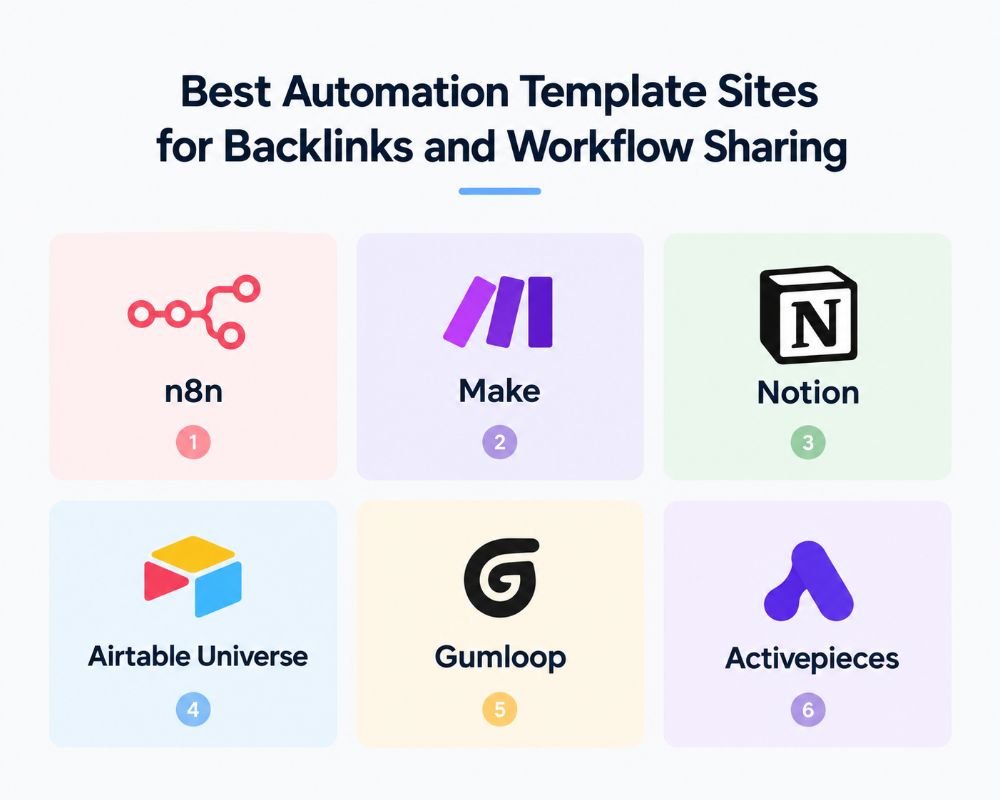
Looking for high-authority websites for backlinks? But automation template sites can save time because several workflow platforms let users share reusable automations, publish templates, or showcase integrations. For bloggers, social media managers, creators, and SaaS owners, these opportunities are crucial for engaging the right users and growing online presence.
However, not all platforms have an external website link. Some have creator profiles, some require approval, and some only allow public workflow sharing.
1. n8n
N8N’s Creator Hub for sharing original automation workflows makes it a strong backlink prospect. Website owners can design useful workflow templates, submit them for publication, and link to relevant setup instructions and/or tutorial pages where appropriate. It also offers strong opportunities for relevant backlinks, creator attribution, and documentation.
Template ideas:
- Automated Backlink Monitoring
- AI SEO Content Research
- WordPress Blog Publishing Automation
- Automated Keyword Research Reporting
Best backlink strategy: Write an SEO automation workflow and thoroughly explain how users can set up their own workflow on your website.
2. Make
Make is a possible backlink source due to its public scenario template library. Creators can build helpful automation scenarios and submit applications to publish them. If approved, public templates can help provide exposure and referral traffic. Before you think of a published template or a creator profile as a direct clickable link opportunity, however, make sure you check if it has an external link that you can click on.
Template ideas:
- Automated Blog Distribution
- Content Scheduling on social media platforms.
- Email Marketing Automation
- Track leads in Google Sheets.
Best backlink option: If the template you publish is one for marketing automation, create a marketing automation scenario and link to a tutorial that explains it. Check the placement of the links first.
3. Notion
Notion has a Template Gallery that offers a backlink opportunity. Creators can submit original templates and use their creator profile to highlight their websites. It’s a valuable prospect for bloggers and website owners looking to earn relevant referral traffic and possibly profile backlinks.
Template ideas:
- Backlink Building Tracker
- SEO Content Calendar
- Guest Posting Database
- Content Marketing Planner
Best backlink strategy: Create an original SEO template post and then link to your site in your creator profile.
4. Airtable Universe
Historically, Airtable Universe has offered the opportunity to share freely available bases and templates. Useful databases can be displayed by creators and may attain some publicity via their public profile. However, double-check external website link placement before it counts as a confirmed backlink source.
Potentially, you can create:
- Creator profile backlinks.
- Public base links.
- Potential contextual backlinks (if external links are available).
Best practice: Create helpful databases; see if your public profile has a website field.
5. Gumloop
Gumloop is a great backlink prospect since they have a community template program that enables creators to publish automation workflows. More importantly, its creator pages invite links to personal websites and courses. This gives you the chance to earn relevant profile backlinks and attract traffic interested in AI automation templates.
You may be able to produce:
- Creator profile backlinks.
- Website referral links.
- Course or automation links.
The best strategy is to provide useful AI workflows and include your website in your creator page.
6. Activepieces
The Activepieces community template submission system provides backlink opportunities. Creators can add automation templates and supply links to their blog or setup guide via supported template fields. For site owners who want to connect published workflows to their own content, the blogUrl attribute is especially useful.
You may be able to produce:
- Backlinks in the blogUrl field.
- Links to guides for setting up workflows.
- Links to relevant blog tutorials.
Best solution: Make an automation template and link it to a thorough tutorial on your site.
How to Find the Best Automation Template Sites for Backlinks
Not all automation platforms are worth your time. Before submitting workflows, check each site and decide whether it can deliver backlinks and referral traffic and whether it’s a genuine source of exposure.
Evaluate Website Relevance and Organic Visibility
First, see if there are people on this site who are interested in your business. A community for sharing workflows, run by marketers or SaaS pros, is more apt to be relevant to your marketing site than a non-marketing automation directory.
Consider these factors:
Relevance to audience: Do your potential customers or readers visit the site?
Public access: Can anyone view its template pages without sign-on?
Google indexing: Does it have any public workflow pages indexed on Google?
Organic visitors: Does it get real users? Contributing?
Understanding the main features of quality backlinks helps you to choose the right link-building opportunity.
Check External Links and Submission Requirements
Research linking and publishing policies on the platform before making a template. See if your website URL can be added to your creator profile or description of your template. Additionally, find out if the submissions have to be manually approved and if the published links have the nofollow attribute or the sponsored attribute or the ugc attribute.
Focus on Opportunities by Link-Building Potential.
Look for platforms with a specific niche, public visibility, and real opportunities to contribute. Focus on templates for relevant products or services, creator profiles with links to their external websites, communities for creators who automate, and software integration directories.
Look for sites that have a higher overall score. Keep in mind that Domain Authority (DA) and Domain Rating (DR) are third-party metrics and not a Google factor. A site relevant to your product or service with a receptive audience may be more useful than an unrelated site with strong authority metrics.
Free Automation Templates: How to Make Workflows that People Will Share
Creating an automated workflow doesn’t require a costly automation tool. Start with free automation templates that address common challenges for businesses, marketers, and creators alike.
Select a specific problem before creating a template.
Look at an everyday, normal task that your target wants to automate.
For instance, a Lost Backlink Tracker with Email Alerts helps SEO experts find lost links and get email alerts for changes to their backlink profile. It’s more helpful and more descriptive than a general SEO automation workflow.
Add Documentation, Testing, and Setup Instructions
A good template should be simple to understand and use. Before publishing:
- Describe the problem the workflow addresses and what it does.
- List down the applications and integrations needed.
- Give clear step-by-step instructions on how to set up.
- Test the entire workflow to make sure it works correctly.
- Do not share API keys, credentials, and personal information.
Well-documented templates are easier to adopt, share, and recommend. The idea is to write something useful to the user, not just to secure a backlink.
Automation Template Submission Sites: Submit and Get Your Backlink
The first step in finding automation template submission sites is to find them. Also, follow your workflow, adhere to the platform’s publisher guidelines, and ensure your website gets a real backlink.
Step 1: Identify the official submission page.
Look for the platform’s official creator program, template library, or submission form. These are the Google search operators you can use:
text
site:example.com submit workflow template.
site:example.com creator program
“Submit your automation template.”
“workflow template submission.”
You need to use your target platform’s domain for the replacement of example.com.
Step 2: Register and set up your workflow.
Create a profile and build a practical automation that solves a specific problem. Create a descriptive title, describe what the benefit is, list the integration(s) required, and outline clear setup instructions.
Step 3: Insert Your Website Link (where applicable)
Fill out your profile as a creator and add the link to your website if it allows for it. If you are allowed and if it is useful, you can also include a contextual link in the template description. Avoid over-optimizing with anchor text, as it can look spammy.
Step 4: Submit, Monitor, and Follow Up.
Make your flow published on the official path. Remember to save the submission URL and date, answer reviewers’ questions, and review the public page once the template has been approved.
Last but not least, take a look at the published HTML to see if your site’s link has been added and the real attributes. Use your backlink tracking spreadsheet to note if the link is “dofollow” or “nofollow,” “sponsored,” or “ugc.
A pro tip: never take a template for granted just because it was approved as a successful backlink submission. Check the external link prior to including it as a backlink in your backlink report.
Dofollow vs. Nofollow: How to Check Automation Website Backlinks?
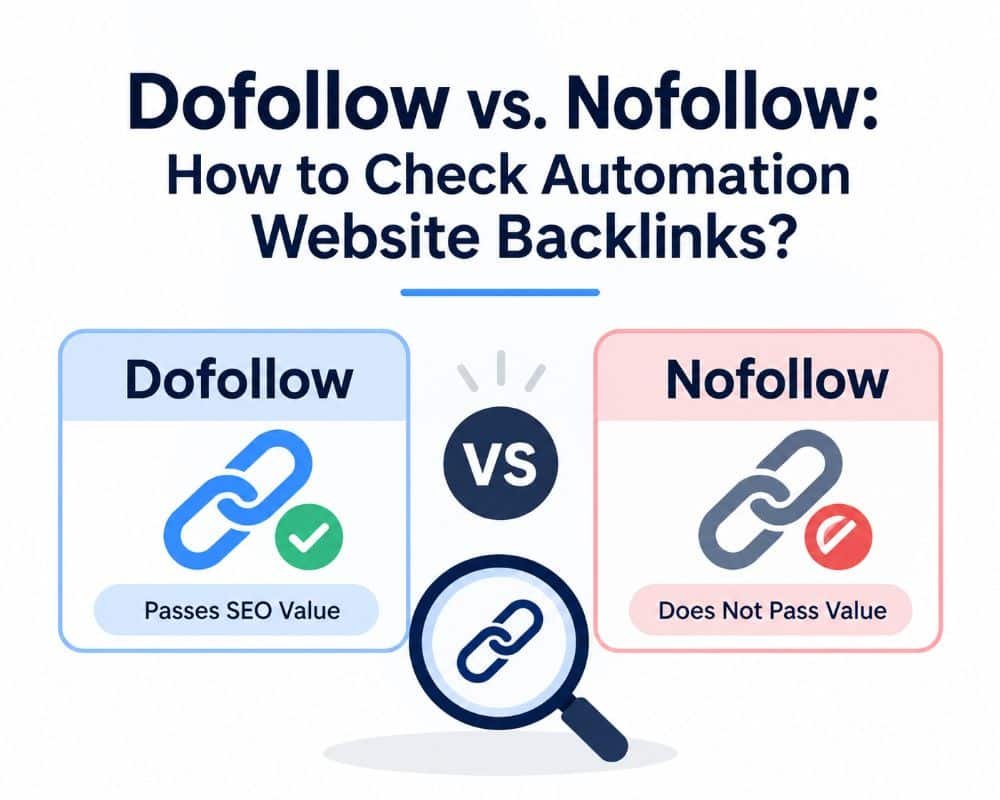
A published automation template doesn’t necessarily mean you are getting a valuable backlink. You get different kinds of links based on the HTML attributes, position, and accessibility of the link. If you see a published template, don’t assume that it offers a backlink opportunity until you see if there is a real external link and how Google treats it.
Know the meaning of “dofollow” links, “nofollow” links, sponsored links, and UGC links.
As you look at automated site backlinks, you’ll find you come across four types of links:
Dofollow: An ordinary HTML link without a qualifying `rel` attribute. Can pass PageRank and can be used as a ranking factor.
Nofollow: Link with rel=”nofollow”`. In general, Google views this as a suggestion, not a command.
A link with an attribute of rel=”sponsored” to indicate an advertisement, sponsorship, or other paid placement.
UGC: Links that have the attribute `rel=”ugc”` and represent user-generated content, such as forum posts and community submissions.
When links occur in user-generated content or paid content on Google, it is recommended that they have appropriate attributes. Importantly, nofollow, sponsored, and UGC links aren’t always bad; they can still bring your brand to the attention of relevant people and drive referral traffic.
Using published templates, check if your template has a real backlink.
When looking for an automation template, you want to see if you’re getting a dofollow backlink, right? Take the following 5 steps:
- Go to the published template page: Go to the public URL of your approved workflow.
- Identify your brand or website: Check the template description, author information, or creator profile.
- Check the HTML of the link: Right-click on the link and select Inspect (or use your browser’s developer tools).
- Examine the ‘href’ and ‘rel’ attributes: Ensure it’s linking to an external website, and note any special attributes.
- Check accessibility and indexation: Make sure the page is publicly accessible, and check its indexation status in Google Search Console or via a Google search.
An example of an external link is this one:
html
<a href=”https://example.com/”>Visit our website</a>
A nofollow link created by the user appears as follows:
html
<a href=”https://example.com/” rel=”nofollow ugc”>
Visit our website
</a>
Another factor to consider is that certain platforms link exclusively to an internal creator profile rather than to your real website. This gives you a link that can be attributed but isn’t always external.
Always: Only count external links that are verified, and keep the attributes of the external links on a separate list.
FAQs About Automation Template Sites Backlink Sources
What Are the Best Automation Template Sites for Backlinks?
N8n, Make, Gumloop, Notion, and Pipedream are the promising platforms. They provide varying options for sharing workflows and publishing. But the rules and requirements vary, so make sure you check them out before you expect a backlink
Is Automation Template Sitas a Good Source of DoFollow Backlinks?
Yes, potentially. Some platforms may provide regular external links;s, others may use nofollow or ugc attributes. Your backlink status is not based on the mere fact that your template is approved, but rather the actual HTML that is published. Counting it as a dofollow requires checking the link beforehand.
Is there a Free Automation Template Submission Site?
Platforms like n8n, Make, and Nothat can share or submit templates without paying for a listing. But some require account registration, manual approval, or publication requirements. Please review their existing policy before submission.
How long does it take to have an Automation Template published?
The time it takes to be published varies based on the review platform. According to the n8n Help Center, reviews typically take 1–7 business days, with many taking around 2–3 days, according to Gumloop. These are review estimates and not guarantees of publication or backlinks.
Do Automation Template Backlinks Compromise SEO?
Yes, because you can earn them by contributing useful content, being a part of the right (and useful) workflows, and following Google’s link spam policies. Do not submit mass submissions or copy/paste templates, or paid placements that are manipulated. Qualify sponsored and user-generated links, and focus on the value they provide rather than how many links they have.
Conclusion
Bloggers, marketers, creators, and SaaS businesses have another option besides guest posting: automation template platforms to generate relevant backlinks. Use three platforms, build meaningful workflows, and follow their submission guidelines. Most importantly, check the attributes of any externally published links before considering them backlinks. Target quality submissions over quantity to build sustainable visibility and referral traffic.
One good automation workflow: publish on a relevant platform, test backlinks, then move to your next opportunity.