Automated Link Building: Stop Wasting Hours on Outreach

As an off-page specialist, it’s hard to send daily emails, follow-ups, and outreach to sites; it can be frustrating and waste your precious time. Now, save your time with automated link building by seamlessly repeating repetitive SEO tasks like finding relevant sites, collecting contact information, outreach admins sending draft emails, scheduling follow-ups, and tracking link placement.
Automate the workflow, not create links with automation.
Automating processes doesn’t mean automation creates backlinks. Google flags links created in large volumes by automated software on forums, directories, profiles, and in comments. When Google flags them, it can cause a huge loss for your site, and you may never recover.
The problem is not using automated tools. But you only use them for automated operations such as finding sites and reviewing them, scheduling follow-ups, collecting site contact information, and sending personalized emails, not on a massive scale.
From link building, “76% of SEO professionals report positive ROI.”
In this guide, I explain how to use automated link building in your SEO strategy without risking a Google penalty, while saving time. It gives you an automated link-building workflow that provides relevant site data.
What is automated link building? How does it work?
Automated link building uses software and AI tools to automate the link-building workflow, speeding up repetitive backlink tasks such as researching relevant websites, finding contact details, preparing outreach emails, and following up and tracking backlinks.
Automation is used by SEO professionals to streamline, organize, and speed up the process and earn high DA backlinks without having to do everything by hand.
Automation works in six steps:
- Find websites that could be a good match for your content or industry.
- Site screening: Assess potential sites for topical relevance, traffic, and editorial quality.
- Contact enrichment: Locate email addresses and other contact information.
- Personalized outreach: Prep/organize relevant link-building pitches.
- Follow-ups: Set reminders and monitor follow-ups.
- Backlink Monitoring: See if links are being published and if they are still active.
If you want to explore how you create content, automated or manual, read our AI Content Creation Software Automated vs Manual Processes Guide.
Manual Link Building vs. Automated Link Building.
Manual link building
- Look for websites individually.
- Find website owners’ email addresses.
- Send personal outreach emails.
- Manually send follow-up emails.
- Import backlinks into spreadsheets.
Automated link building
- Discover potential link prospects using SEO tools.
- Automatically discover contacts.
- Create personalized email drafts using AI.
- Schedule follow-up sequences.
- Monitor acquired backlinks using SEO software.
| The best factor | Manual outreach | Automated approach |
| Prospect discovery | Time-consuming | Faster |
| Contact research | Manual | Partially automated |
| Email personalization | Fully manual | AI-assisted |
| Follow-ups | Manual reminders | Scheduled |
| Quality control | Human-led | Human approval needed |
| Scalability | Limited | Higher potential |
The best choice is a hybrid model that automates research and administrative tasks while keeping prospect approval, email templates, meaningful personalization, and relationship building under human control. That way, Google sees them as ethical link-building tactics, not spammy automated backlinking.
Types of Automated Link Building
Many companies offer backlink plans, but when you build them with tools or hire the best link building companies, you need to know about these two types of automated link building.
There are two types of automated link building: risky and safe Automated link building
Automated link building is when you use software to generate, request, or manage links with minimal manual effort. It is divided into two distinctly different categories.
1. Risky: Automated Link Creation
In this case, the links are placed by the software and are not selected by a real website owner to be displayed. Common methods include:
- Blast tools that link your URL and anchor text to thousands of forums, blog comments, directories, and profile pages.
- Connect networks that propagate links to sites the service regulates, like private blog networks.
- Site content, bulk-generated with your links inserted and published on low-quality sites.
The Google link spam policy states that automated programs that make links to your site constitute an offense. These links can have no ranking value, and a manual action can demote your site. Recovery is slow.
2. Safe: Automated Prospecting and Outreach
In this case, the software does the heavy lifting, but the site owner still decides whether to link. Common uses include:
- Prospect: Identify relevant sites, resource pages, and broken links.
- Find the correct editor or owner email.
- Outreach: Personalized e-mailing and follow-up calls.
- Monitoring involves tracking new and lost backlinks and ensuring nothing is done manually in Search Console.
The reason Google accepts the link is that it’s voluntarily added by the other site. Someone should still read each prospect, and emails should be tailored to the individual prospect, not sent in bulk.
Why Use Link Building Automation? 4 Benefits will save you time
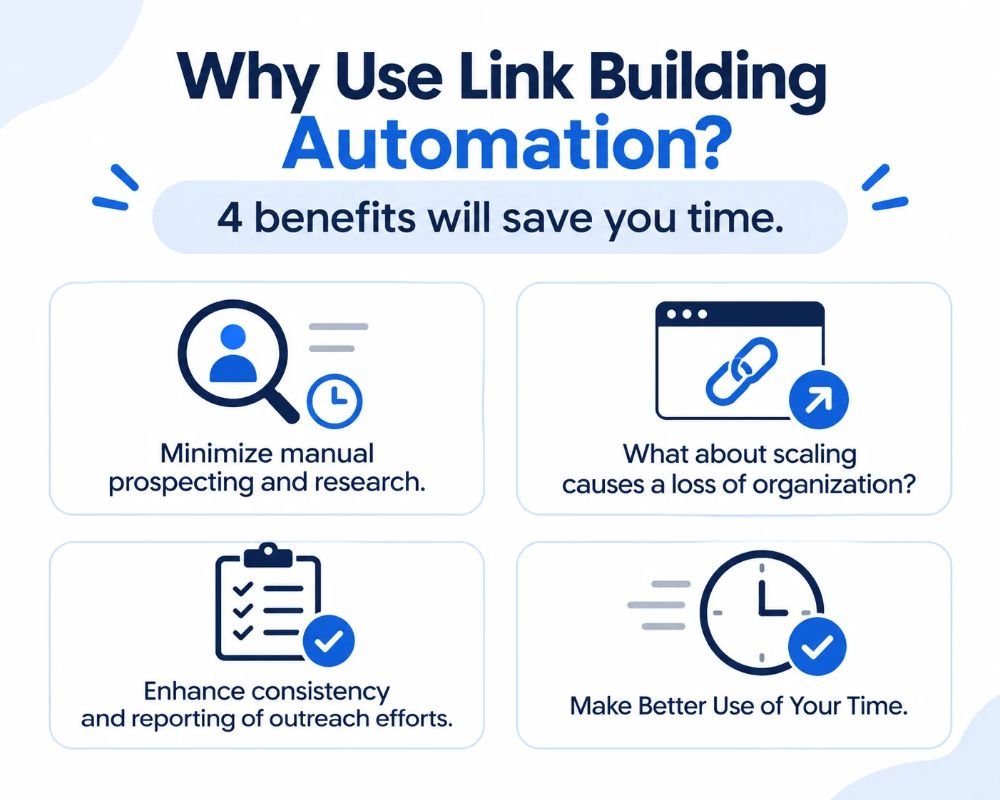
Manual outreach involves multiple repetitive processes that can make link-building campaigns hard to manage. By automating these processes, link building automation outreach saves 70% of time and lets SEO professionals focus on decision-making rather than administration. Here are 4 useful points.
1. Minimize manual prospecting and research.
Tools can be used to find hundreds of potential prospects, find backlink opportunities for competitor sites, and narrow down websites by relevance and quality, rather than having to search for one at a time. Even though you have reviewed the results, you still need to review them before they can be added to a campaign.
2. What about scaling causes a loss of organization?
It’s easy to get confused when you have multiple campaigns in separate spreadsheets. Automation platforms consolidate prospect lists, follow-up sequences, reminders, and campaign history, making it easier to track follow-ups and avoid losing contacts.
3. Enhance consistency and reporting of outreach efforts.
Automated systems help you keep contact records organized, track email responses, and monitor published backlinks. Campaign results can be compared, positive opportunities can be spotted, and worthwhile opportunities can be prioritized.
4. Make Better Use of Your Time
With the advent of automation, repetitive administrative tasks will be reduced, but research and relationship-building are not suspended. For instance, when manually prospecting, you have to go through each website and search, check, and record one site at a time. A tool-assisted process can collect and collate potential prospects in batches, letting you spend more time qualifying prospects and communicating with them more personally.
The specific amount of time that can be saved will vary by tools, campaign size and review process. The idea is to ensure that outreach is more manageable; that is, not just to get more email.
What Can You Automate? Automatic Link Building vs Manual Control
Can you automate link building 100%? Not entirely. Software performs repetitive tasks like prospect discovery, contact collection, email drafting, follow-ups, and backlink monitoring. But you still need human judgment to assess a website’s quality, build relationships, and earn high-authority links and editorial placement. Depending on the task, it can be done more or less automatically.
| Task | Automation level | Human involvement |
| Prospect discovery | High | Review relevance and potential opportunities. |
| Contact finding | High | Verify important contacts. |
| Website scoring | Partial | Approve website quality. |
| Email drafting | Partial | Edit and check personalization. |
| Follow-ups | High | Handle meaningful replies. |
| Link placement | Low | Secure editorial approval |
| Backlink monitoring | High | Investigate problems and lost links. |
This isn’t because it’s the same as automatic link building, but because automatic link building doesn’t mean you leave your website to software to build links. A tool can identify a website and write an outreach email, but it doesn’t always understand editorial relationships or know whether a specific publisher will accept your request.
The most effective strategy is to use a system that automatically captures and manages data while still allowing human oversight of relationships, editorial decisions, and link quality.
How to Create a Link Building Workflow (Step by Step)
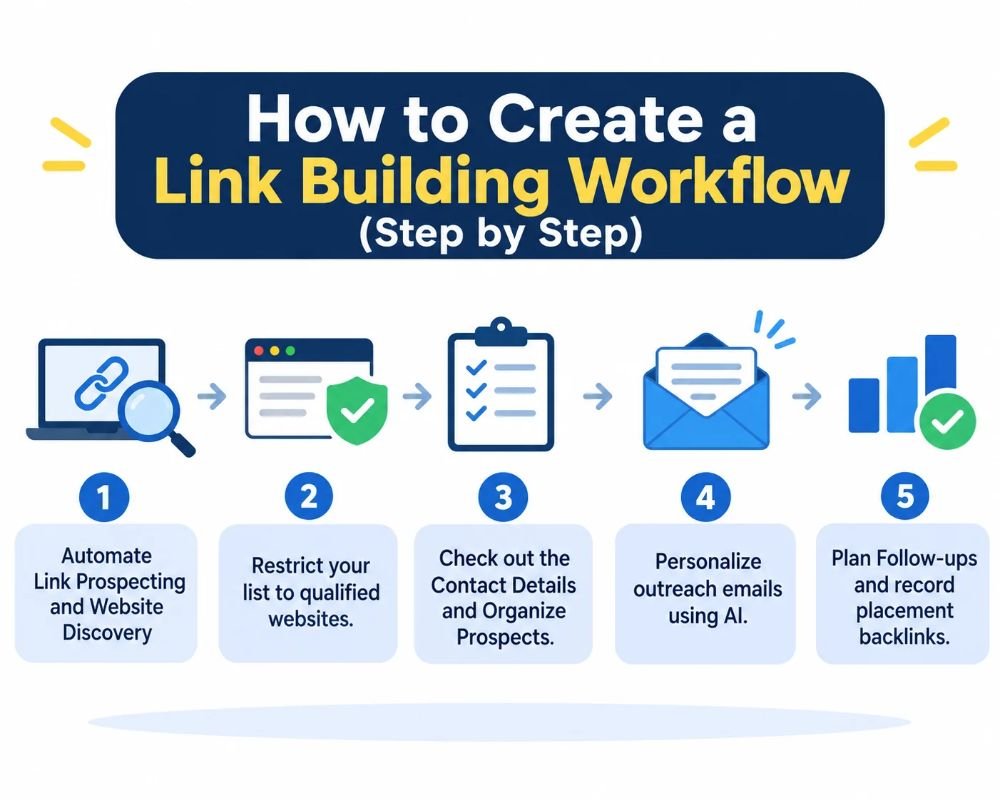
An efficient automated link building process integrates prospect research, website analysis, outreach, and backlink tracking into a seamless workflow. Don’t automate every decision; use tools for repetitive tasks, and evaluate each major opportunity before deciding.
Step 1. Automate Link Prospecting and Website Discovery
The first step is to discover sites that would naturally link to your site. You can use SEO tools like Ahrefs or Semrush to find websites linking to your competitors, identify backlinking opportunities, and find relevant publications in your industry.
Also, find niche websites, resource pages, and blogs that commonly publish articles about your topic. Group prospects by niche and outreach potential. For instance, an SEO website could divide digital marketing blogs, technology publications and business resource pages.
This makes it easier to run targeted campaigns instead of pitching to a different website each time.
Step 2. Restrict your list to qualified websites.
Identifying target websites is just the first step. Investigate if they are worth contacting before spending time on outreach.
Consider each prospect’s performance against these criteria:
Relevance of topical content: Does the website regularly publish content related to your industry?
Organic traffic: Is it getting a legitimate amount of search traffic, and does it show signs of search traffic?
Editorial standards: Does it publish useful, original articles or thin articles that are made mostly for the links?
Link patterns: Any unusual linking patterns that might indicate suspicious activity from the referring domains or links to other websites that do not belong to their niche?
Page relevance: Does your link have to be on a particular article or resource that will be useful for the reader?
Some third-party metrics like Domain Authority (DA) and Domain Rating (DR) can help with general comparisons, but shouldn’t be the only factor. You may find a more meaningful editorial opportunity with a lower authority score website that is relevant to your niche than with a high authority score website that is not relevant to your niche.
Step 3. Check out the Contact Details and Organize Prospects.
After approving a website, identify the correct person to contact. Discovery and verification tools for email can be used to find business email addresses, find editors or website owners, or find relevant contributors.
- Understand that you are about to add contacts to your campaign:
- Check key email addresses to minimize unnecessary delivery errors.
- Clean up websites and contacts.
- Write down the web address, a contact person, the contact email, and the article.
Include comments noting why each prospect is a good fit.
Store this information in an all-in-one outreach database or campaign tool. This ensures that all the information is not spread out across various spreadsheets and that it is easier to handle multiple campaigns.
Step 4. Personalize outreach emails using AI.
AI can scan web pages, find relevant articles, and draft outreach emails. But don’t send messages without verifying their accuracy and suitability.
AI outreach messages increase the response rate by 4.19% vs. 2.60% for non-AI.
For instance, if you’re sending a general email, you might have something like this:
Before:
Hi, I’m here with my website and want you to give me a backlink. Do you accept guest posts?
It gives the recipient little or no reason to respond.
After:
We’ve recently had one of our practical guides published about identifying indexing issues that you might want to mention in your article. We found your section on crawl errors especially useful, so we thought you might want to include it. Do you think it would be a good idea to check it out as another source for your readers?
The second message will focus on a specific topic and explain why the resource might be beneficial. Check the recipient’s name, article reference, and suggested link opportunity before sending. AI shouldn’t create familiarity or make unsupported claims; it should personalize communication.
Step 5. Plan Follow-ups and record placement backlinks.
Many outreach campaigns involve more than an email. Schedule 2 to 3 follow-up opportunities as appropriate to the recipient and campaign, using your platform.
Make rules for your sequences:
- End follow-up when a response, a decline, or an opt-out is received.
- Document positive responses and continued dialogues.
- Update the status of each prospect as links are accepted/published.
- Track down live and relevant published backlinks.
- Regularly check your results to see which prospects and prospecting techniques are responding well.
Takeaway: An organized workflow ties prospecting, contact management, email communication, and backlink tracking into one. You can manage the campaign from one place and keep all vital decisions under human control, rather than using separate spreadsheets, email threads, and tracking documents.
4 Automated Link Building Tools Worth Considering
The best automated link building tools vary based on your campaign’s specific needs. Some platforms are dedicated to competitor backlink research, and others can aid you in managing your outreach emails, follow-ups, and publisher connections. There are four things to consider.
1. Use Ahrefs for competitor backlink research.
With Ahrefs, SEO experts can analyze their competitors’ backlinks, find the domains that link back, and see the pages they are most likely to link to. This can be utilized to determine websites that may be interested in linking to similar resources on your website.
2. Semrush
Semrush’s Backlink Gap tool compares backlink profiles with competitors to identify domains linking to other sites but not to yours. This gives marketers a basis to evaluate and focus on potential link-building opportunities.
3. Pitchbox: Automated Outreach and Follow-Ups
Pitchbox makes outreach campaign management easy, from prospecting and contact discovery to customized email sequences and follow-up scheduling. It can also be utilized to track responses and monitor backlink placements throughout campaigns for agencies.
4. Buzzstream: CRM and Relationship Management
BuzzStream streamlines prospect list creation, contact data maintenance, contact outreach customization, and campaign progress monitoring. It would benefit teams that communicate continuously with publishers because of its relationship-management capabilities.
It is important to compare the different automated link-building tools.
You don’t have to have all four subscriptions. A small business can start with one research system and a basic outreach CRM.
Multiple-campaign agencies could find a more comprehensive outreach platform helpful. Use tools that fit your team’s tasks, size, and budget, not the number of features they offer.
Is Automated Link Building Safe for SEO? Avoid Google’s Link Spam Penalties
Automated link building is safe as long as software supports it and real people make the call. These programs, which automatically add links to pages, violate Google’s link spam policy and can harm your site: forum and comment blasts, directory submissions, and link networks. Google’s SpamBrain is designed to identify these patterns, and the consequences often include lost revenue, a manual action, or a lengthy wait to recoup lost rankings.
When it comes to automation and outreach, there are no risks. Software can seek out prospects, discover contact details, arrange emails, and track backlinks, provided a person will check each site, and the website owner will determine if they wish to link. This means the link is editorial, and Google will accept it.
How to stay clear of link spam penalties?
- Don’t let software add links for you; however, you may approve each one in turn.
- Before accepting any prospects, review them manually to confirm they are relevant, have content, and don’t sell links.
- Make each outreach letter individual and send in smaller groups.
- Maintain a mix and variety of anchor text.
- Mark has placed ads with the “rel=”sponsored” attribute.
- Be sure to check for manual actions in Search Console, and only disavow spam if it is unambiguous.
Conclusion
By automating repetitive tasks like prospect researching, finding potential contact emails, scheduling emails, and tracking your backlinks, automated link building can make backlink campaigns more manageable. Tools like Ahrefs, Semrush, Pitchbox, and BuzzStream can help with different parts of this process, but choose the right platform for your campaign needs and budget.
But automation doesn’t guarantee quality backlinks or higher rankings. You’ll still need to review websites, tailor outreach, and focus on relevant editorial opportunities. Don’t use automated link-making or other tactics that do not follow Google’s Spam policies.
Choose one part of your process that takes the longest, automate it and track the outcomes. The best strategy is to use efficient software, then add human judgment to create meaningful, long-lasting backlinks.