15 Powerful Content Creator Apps to Boost Productivity
Your ideas aren’t the problem. Your apps are chaos. The main problem every content creator faces is a fragmented workflow. You jump from the research tab to the keywords tab, and making a thumbnail from scratch costs you a lot of time.
When every task requires a different tool, staying consistent can feel like a full-time job. But the right content creator apps simplify these tasks, create high-quality content, save you time, and help you turn ideas into multiple pieces of content.
Whether you’re a vlogger, YouTuber, photographer, or social media creator, you might be wondering which apps are worth it for the time and money.
In this article, I share 15 of my personal content creator apps for every stage of content creation, from research and ideation to photo editing, video editing (long or short), and monetizing your accounts.
What are content creator apps?
Content creator apps are digital tools that help you plan, write, produce, edit, design, and publish content without dozens of disconnected tools. They analyze content across social media platforms like Instagram, YouTube, TikTok, and LinkedIn.
They cover everything from research to video editing, thumbnail design, and audience growth tracking, simplifying the content creation workflow.
With AI content creation tools, creating content in 2026 is no longer slow; you can easily create content without showing your face, which is the real benefit of automation.
The content creation economy market is expected to reach $480 billion in 2027. It is the largest market, and it offers strong earning potential. “94% of creators use AI tools in their creation workflow.”
For example, a creator could plan a content calendar in Notion, edit their Reel in CapCut with AI-powered features, create the thumbnail in Canva using a simple prompt, and schedule their post in Buffer or Later. The modern stack combines production and distribution tools rather than relying on a single app for everything.
How Content Creation Apps Improve Productivity
Content creation apps help creators work more productively by eliminating repetitive tasks, consolidating content assets and processes, and letting them publish without switching between tools. The best B2B content creation platforms offer content repurposing, caption generation, beat syncing, script-to-video, background removal, and auto-captions, many of which are AI-powered and save significant editing and publishing time.
What to Look for Before Choosing an App
Consider factors in your workflow, such as your content format, budget, experience level, and content needs. Identify features that address your needs and problems, then avoid overpaying for features you don’t need.
Consider how easy it is to use, edit, add AI, work on it with different platforms, collaborate, and export quality. Free plans work great for beginners, and when your content business gets bigger, you might need anything that’s not included in the free plan.
Our step-by-step B2B writing service guides you through briefing, writing, and onboarding to measure results from your first projects.
Comparison table of powerful Content Creation Apps
| App | Key features | Price | Free plan available? | Who should use it? |
| 1. Google Trends | Search trends, topic comparisons, regional interest, related searches | Free | Yes, free to use | Bloggers, YouTubers, SEO writers, and social media creators |
| 2. vidIQ | YouTube keyword research, topic ideas, competition indicators, AI growth suggestions | Free; paid Boost and Max plans | Yes, limited tools | YouTubers targeting search-driven views |
| 3. TubeBuddy | YouTube SEO, title and tag assistance, analytics, thumbnail testing | Free; paid Pro and Legend options | Yes, limited tools | YouTubers optimizing videos and managing channels |
| 4.ChatGPT | Brainstorming, outlines, scripts, rewriting, summarization, content repurposing | Free; paid plans available | Yes, usage limits apply | Bloggers, marketers, freelancers, and creators who need ideas or writing support |
| 5. Notion | Content calendars, documents, databases, task management, collaboration | Free; paid plans available | Yes | Solo creators, content managers, and teams |
| 6. Milanote | Visual boards, notes, image references, storyboards, creative planning | Free; paid plans available | Yes, limits apply | Video creators, designers, and visual storytellers |
| 7. DaVinci Resolve | Video editing, color grading, visual effects, audio post-production | Free version; paid Studio version | Yes | YouTubers, filmmakers, and creators who want advanced editing control |
| 8. Adobe Premiere Pro | Timeline editing, effects, titles, audio tools, AI-assisted features | Subscription: individual plan listed at US$22.99/month with annual billing, billed monthly | No permanent free plan; free trial available | Professional video editors, agencies, and experienced YouTubers |
| 9. Descript | Transcript-based editing, transcription, captions, filler-word removal, clip creation | Free; paid plans from US$16/month with annual billing | Yes, limited media hours and AI credits | Podcasters, educators, interviewers, and tutorial creators |
| 10. CapCut | Short-form video editing, templates, effects, captions, AI-assisted tools | Free; the Pro plan is listed at US$19.99/month | Yes, basic editing tools | TikTok, Instagram Reels, and YouTube Shorts creators |
| 11. OpusClip | AI-assisted clip selection, auto-reframing, captions, video repurposing | Free; the paid Starter plan listed at US$15/month. | Yes, limited credits and exports | Podcasters, interviewers, and creators repurposing long videos |
| 12. Adobe Lightroom | Photo enhancement, color correction, presets, masking, image organization | Free mobile options; paid plans available | Yes, selected features | Photographers, travel bloggers, and lifestyle creators |
| 13. Canva | Design templates, thumbnails, social graphics, presentations, brand assets | Free; Pro listed at US$144/year for an individual | Yes | Beginners, marketers, bloggers, and social media creators |
| 14. Beacons | Link-in-bio pages, digital product sales, creator business tools, audience insights | Free; paid plans available | Yes, check current feature limits | Influencers, independent creators, and digital entrepreneurs |
| 15. Patreon | Paid memberships, exclusive content, community features, digital product sales | No standard flat monthly creator subscription; platform fees and applicable processing fees may apply | Creators can start without a standard monthly subscription, subject to current terms | Creators with engaged audiences who want membership-based revenue |
15 Content Creator Apps to Boost Productivity
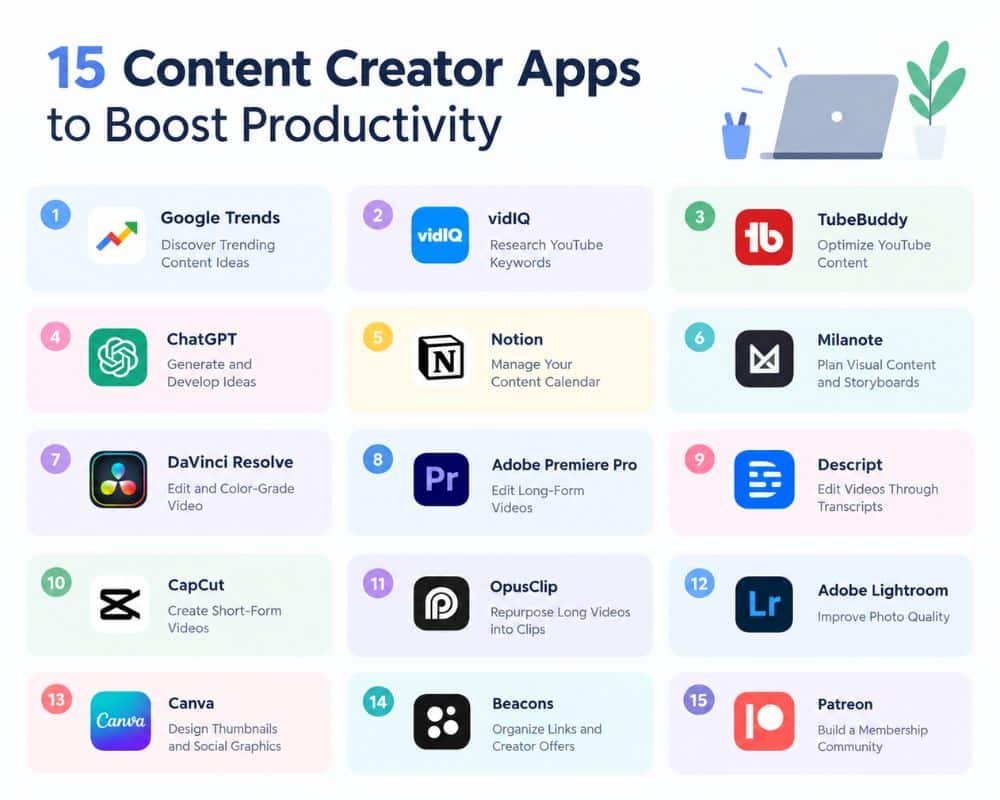
The best content creation apps vary by content type, audience, and workflow. YouTubers need video research, editing, and thumbnail optimization tools, while bloggers need research and writing tools. Social media creators often need easy editing, visual design, and scheduling tools.
Explore our professional B2B content creation services to see how strategy-led content can attract decision makers and shorten your sales cycle.
These are the best apps for each step of the content creation process and who they suit best.
A Kit research AI creator economy report found that “82.7% of creators use AI for brainstorming and writing, while 72.8% use it for research and 46.8% use it to create images.”
This shows that most creators use different apps with AI for planning, researching, writing, designing, and editing their content to increase their productivity.
Here are breakdown of each workflow.
Research and ideation: Ideal for bloggers, YouTubers, and social media creators who require trending topics, audience analytics, and innovative ideas for content.
Pre-production: Tab is ideal for video makers who need to organize scripts, scenes, and shot lists and schedule recordings.
Video editing: Ideal for YouTubers and video marketers who want to mix footage, improve audio quality, add transitions, and create polished videos.
Best for: Instagram users, photographers, and lifestyle influencers who want professionally styled photos.
Visual packaging: Ideal for YouTubers and social media managers who design eye-catching thumbnail graphics, covers, and branded graphics.
Long-form editing: For education content creators, podcasters, and YouTubers making videos, tutorials, interviews, reviews, or other detailed content.
Short-form editing: Perfect for TikTok creators, Instagram Reels publishers, and YouTubers who want to create short and engaging videos from ideas or clips.
Monetization and optimization: Useful for established YouTube accounts and channels looking to review performance, boost visibility, and find monetization opportunities.
Using apps that fit your needs helps you build an effective workflow without paying for extra features you don’t need most of the time.
Here, I break down each content-creation workflow and share the best tools for planning, ideation, pre-production design, video editing, and monetization for your account.
Best Content Creator Apps for Research and Ideation
It all begins with good content ideas. You don’t have to guess what people want to read; use research tools to find trending topics and keyword opportunities and turn ordinary questions into valuable content. These content creator apps are a great solution for creating videos, blog posts, and social media content based on actual audience interests.
1. Google Trends: find trending content ideas.
Using Google Trends, you can view search trends over time, compare trends, and find related trends. It helps bloggers, YouTubers, and social media creators test concepts before spending time producing them.
For instance, compare two videos from the USA and the UK on the same topic to spot regional differences in interest. This can help you choose a more suitable topic for your audience, but it doesn’t guarantee views or engagement.
2. VidlQ: Research YouTube Keywords
Using various research tools, keyword estimates, and competition indicators, vidIQ helps YouTubers find video ideas and assess potential opportunities. It’s especially helpful for content creators who want to be seen in YouTube searches.
Check out keyword suggestions and use the results to create a good, relevant video title before publishing. Think of keyword estimates as recommendations and not promises of ranking.
3. TubeBuddy: Optimize YouTube Profile
TubeBuddy also offers features like keyword suggestions, analytics, and thumbnail testing to help you optimize your YouTube channel and videos. It is ideal for creators who publish regularly and want to improve their video packaging and understand performance.
For instance, tweak a video title around a relevant search term and analyze its performance after it goes live to inform future content choices.
4. ChatGPT: Generate and Develop Ideas
Use ChatGPT to brainstorm ideas, structure articles, create video scripts, summarize research, and repurpose content for various platforms. It comes in handy when you are starting or want to speed up content planning.
For instance, have it come up with 5 video angles for a typical question asked by viewers. Then check the facts, include your own experience, and make the end content original and useful.
Best apps for Content Creation Planning and Organization
Ideas, deadlines, scripts, and assets are best kept organized when research produces better results. Planning apps help one person or a team to plan the production without losing sight of what is next.
5. Notion: Manage your content calendar.
Notion is a single workspace for docs, databases, project boards, and collaboration. Utilize it for research organization, script storage, or tracking every post from idea to publish.
For instance, create a content schedule with dedicated columns for topic, social network or platform, publishing date, and production status. This will help you visualize upcoming work and keep it steady.
6. Milanote: Visual Content and Storyboards Planning
Using boards, notes, images, links, storyboards, and more, Milanote is here to help creators organize their ideas visually. It’s especially valuable for video producers, designers, and visual storytellers who dislike lengthy documents and prefer planning with references.
For instance, before making a YouTube video, put your ideas, shots, and visual concepts on a board. This helps you get a sense of direction before production.
Best Content Creation Apps for Video Editing
The ideal video editing app depends on your experience, the project’s complexity, and your video format. Some tools offer in-depth control for long-form productions, while others speed up editing for spoken content.
7. DaVinci Resolve: Edit and Color-Grade Videos
DaVinci Resolve is video editing, color correction, visual effects, and audio post-production software. It’s a great choice for content creators who want precise control over polished videos, tutorials, and longer projects.
For instance, add a how-to video to a multi-track timeline, tweak the video colors, and mix audio on the timeline before exporting.
8. Adobe Premiere Pro: Edit Long-Form Videos
For more advanced projects, Adobe Premiere Pro offers timeline editing, effects, titles, audio tools, and AI-assisted features. Production teams and experienced creators can use it to produce YouTube videos, interviews, tutorials, and branded content.
For instance, edit interview footage, B-roll, titles, and audio to create a professional video. When choosing one, consider the learning curve and subscription fee.
9. Descript: Edit videos with transcriptions
Descript’s transcription and text-based editing make spoken-word video and podcast editing a breeze. It supports features such as captioning, removing filler words, and creating clips, which come in handy for teachers, podcasters, and interview makers.
For instance, if you recorded an interview, edit out unnecessary parts of the transcript, then watch the video to make sure the cuts look good.
Social Media Content Creation Apps for Short Videos
Short-form video is usually edited quickly, framed vertically, includes captions readers can follow, and is easy to repurpose. These apps help creators make clips for TikTok, Instagram Reels, and similar platforms like YouTube Shorts.
10. CapCut: Make Short-Form Videos
CapCut offers video editing, templates, effects, captions, video resizing, and AI video editing tools. Perfect for beginners and social media content creators who do not need a lengthy editing process to create interesting, vertical videos.
For instance, cut out clips from phone footage to create a short video, add captions, and fine-tune the footage for the intended platform. See which features are available, what they cost, and where to find them on your device.
11. OpusClip: Repurpose Long Videos into Clips
OpusClip converts longer recordings into potential short-form clips. Tools for selecting clips, reframing, and adding captions can save time when reusing interviews, podcasts, and other long videos.
For instance, upload an interview, review the recommended clips, and edit the best ones before sharing them on your platforms. Review the context and accuracy of the automatic choices.
Best Content Creating Apps for Photo Editing and Design
Use strong visuals to keep your creators’ style consistent in your thumbnails, social posts, photos, and campaign assets. Depending on whether you need detailed photo edits or quick, ready-to-use designs, the best app will differ.
12. Adobe Lightroom: Improve Photo Quality
Adobe Lightroom helps visual creators and photographers enhance exposure, color, and other image details. Presets, masking, and photo-organization features also help ensure a series of photos look consistent.
For instance, keep the colours and lighting of campaign photos consistent across your site or social media feed.
13. Canva: Design Thumbnails and Social Graphics
Use templates and design tools to easily create thumbnails, social media graphics, presentations, and more in Canva. This is especially useful if you’re a beginner marketer or creator who needs consistent designs but doesn’t have advanced graphic design skills.
For instance, create a YouTube thumbnail template with your branding colors and fonts, then customize it for each new video.
Apps for Content Creators to Monetize Their Work
Producing content is only half the battle in building a sustainable creator business. There’s also a need to engage your followers with your resources, sell your digital products, and make money off your followers.
These 2 apps turn content into business opportunities.
14. Beacons: Organize Links and Creator Offers
The Beacons platform gives creators a hub to share links, showcase their work, and promote offers. It offers features such as link-in-bio pages, ecommerce for digital products, and creator business tools. It helps influencers, social media content creators, and self-employed individuals guide followers to the right resources.
Connect your Instagram or TikTok page to your Beacons page with your portfolio, newsletter sign-up and digital product.
15. Patreon: Build a Membership Community
.
Patreon lets creators offer exclusive content and paid memberships to supporters. It is ideal for creators with a dedicated fan base who can offer more value through tutorials, behind-the-scenes footage, or bonus videos.
For instance, a YouTuber could provide bonus lessons or updates for subscribers who wish for additional content that is not included in public videos. Check out Patreon’s existing fees and terms before selecting a plan.
How to Build a Productive Content Creation Workflow
The magic number of 15 apps isn’t required for efficient content creation. Begin with some complementary tools that address your most serious bottlenecks, then build your toolbox as needed.
Step 1. Research and validate your idea.
To research audience interest, use Google Trends, and to research YouTube keyword opportunities, use VidIQ or TubeBuddy. Have ChatGPT generate ideas for angles of your content and independently fact-check claims.
Step 2. Plan and produce your content
Plan scripts, deadlines, and production using Notion or Milanote. For detailed video editing, pick DaVinci Resolve or Premiere Pro, and for projects based on video transcripts, select Descript.
Step 3. Repurpose and package your content
Utilize the vertical editing feature of CapCut and the short-form clip identification feature of OpusClip. Create thumbnails with Canva and edit photos with Lightroom.
Step 4. Publish and monetize
Use Beacons to direct viewers to your newsletter, portfolio, or digital products. If you have an audience that is willing to pay for exclusive value, then you should consider Patreon memberships.
For example, one 10-minute YouTube video might include a full-length upload, three short clips, a custom thumbnail, and a promotional social post. This is a sample workflow; results will vary based on your footage, editing decisions, and audience.
How to Choose the Best Content Creator Apps for Your Needs
The best content creation apps vary by content type, experience level, budget, and objectives.
- For Beginners: Choose tools that are easy to use and offer free plans.
- YouTubers: Focus on keyword research, video editing, thumbnails, and channel optimization.
- Short-form creators: Focus on vertical video editing, captions, and repurposing videos.
- Photographers and designers: Select photo-editing and graphic-design software.
- Professional teams: Assess collaboration, integrations, licensing, and project complexity.
Before subscribing to any app, review each app’s features, learning curve, overall cost, compatibility, and practicality. Test on a real project first. If it saves you enough time or makes your work efficient enough to be worth it, keep it in your toolbox.
Conclusion
The right content creator apps can save you time and let you focus on producing content that matters to your audience. Each tool serves a different purpose, from finding trending topics on Google Trends to editing videos in DaVinci Resolve, creating designs in Canva, and earning money on Patreon. The best content creation apps depend on your content, experience, budget, and goals.
You don’t need all 15 tools to build an efficient workflow. Don’t use too many apps at first; use only those that solve your biggest problems, test them on real projects, and add more only if needed. Together, they can optimize production, ensure consistency, and boost your creator business.