7 Best AI Quiz Creation Tools for Teachers 2026: Instant Tests
Creating the quiz now doesn’t take hours of your evening. AI innovates the teacher’s workflow with ease and efficiency; you only have the ability to use these AI tools. Yet writing questions, making assignments, checking papers with proper grading, and adjusting difficulty become the most time-consuming parts for teachers.
But here is the good news: AI helps you in making the quizzes. The best AI quiz creation tools for teachers in 2026 turn the presentation, PDFs, and YouTube video links into ready-to-review quizzes in minutes.
The quiz creator tool is not like you only give input of study material and they generate a quiz; after these tools generate a quiz, they straight drop it in a Google Drive link and print format. You can also turn them into leaderboard games, which your students really love and increase their engagement when they solve quizzes.
Keep in mind, teachers, that when you use AI tools, they also make mistakes and produce weak, inaccurate, or poorly aligned questions. So, always double-check your questions and quiz options to maintain the natural flow, customization, and students’ engagement.
In this article, I explain to you seven best AI quiz creation tools for teachers in 2026, which help teachers save their time and focus on their deeper instruction and personalization. We tested all these tools for about 3 months and will give you a report on the basis of what you actually export and output from the tools.
How We Chose the Best AI Quiz Creation Tools for Teachers 2026
Not every AI tool performs well to generate the quiz. When it comes to AI tools for teachers, not every tool is excellent at making quizzes.
The tools were assessed on the basis of their features that will impact most in actual classroom workflows, not only in terms of speed of question generation. The areas of comparison are export options, quality of the quizzes, usability, and engagement of students.
Prioritizing Export Compatibility First.
An effective quiz tool should enable teachers to quickly place assessments in locations they need them. We looked at PDF/print, DOCX, QTI, Moodle XML, CSV/Excel, LMS integrations, classroom platforms, shareable links, and Google Classroom or forms. The study identifies key aspects of comparison between AI quiz tools, including input/output compatibility and classroom integrations.
AI Quiz Generation Quality
We examined the effectiveness of each tool to convert from source material to useful assessments. The features under consideration were PDF capability, generation of documents to quizzes, variety of questions, answer explanations, difficulty controls, standards alignment, and editing and/or regeneration options.
Teacher Workflow and Usability
A top-notch AI quiz creator ought to spare teachers time, not add to their workload. We thought about the number of steps it would take to create a quiz from the source material, the ability of the teacher to edit the questions created, ease of student access to assessments, and how much it would save the teachers from manually formatting the quiz.
Engagement and Gamification
We also analyzed features that can enhance the interest of the quizzes, such as points, leaderboards, avatars, multimedia, live games, and adaptive practice. The study pinpoints the following dimensions of comparison: gamification, customization, integrations, question formats, and input types.
Best AI tools for Quiz creation for teachers in 2026
The best AI tools for quiz creation for teachers are QuestionWell, QuizGercko, CogniGuide, and Quizalize. Also read the guide: asynchronous learning vs synchronous learning, which helps you to decide which is best. Double-check the price of each tool.
Quick Comparison Table of Quiz creation tools
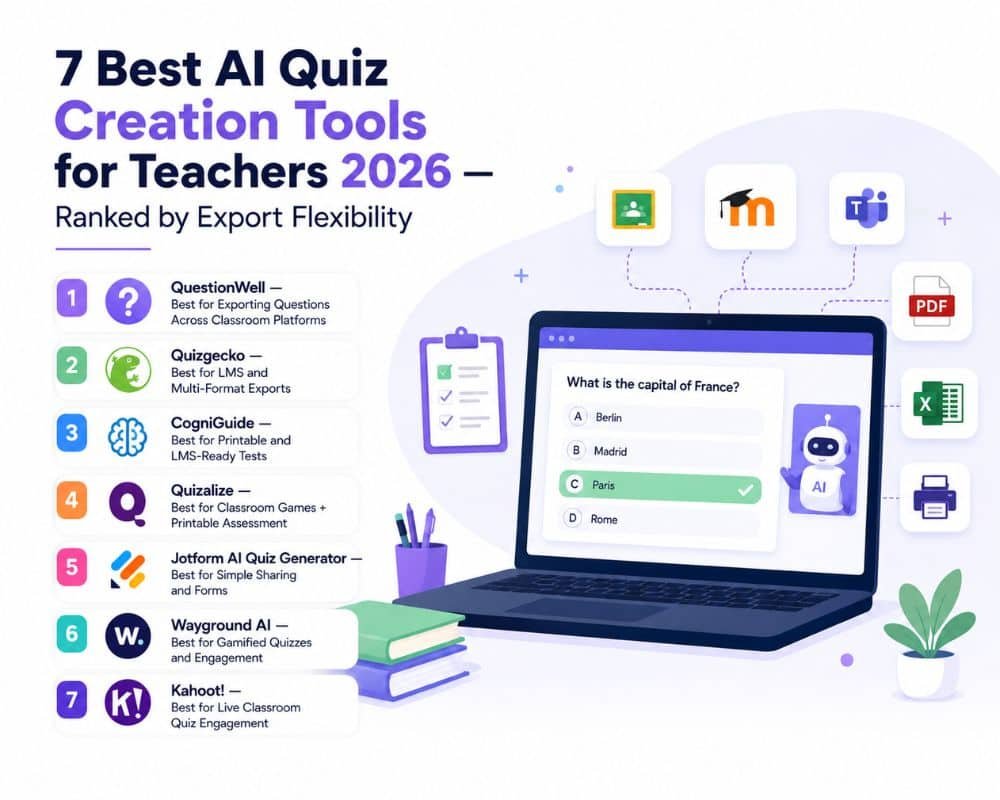
| Tools | Best for | Key Output/Export | Main Input | Engagement | Price Plan | Free trial |
| Question Well | LMS and Classroom portability | 22+ education platform/tool exports | Text and Content | Interactive assessment | $5.83/mo billed annually ($70/year) | Free plan offer for 2 weeks. |
| Quizgercko | LMS-ready assessment | Aiken, CSV, PDF, Excel, and QTI. | PDF, doc, notes, and video | Study tools | Plus from $9/mo billed yearly | Free for a 3-day trial after they charge. |
| CogniGuide | Printable quiz and LMS tests. | PDF, DOCX, QTI 2.1, Moodle XML | PDF, Docx, PPT, and images. | Explanations | Paid tier available; pricing varies by plan/credits. | Free tier, with no credit card required; paid plans provide higher generation limits and advanced models |
| Quizalize | Classroom games and printable assessments | Classroom printable assessment. | Lesson Content | Strong Gamification | Standard plan available; current site offers 30-day trial | Free Basic Plan |
| Jotform AI quiz | Simple quiz sharing forms | Forms, links,Google workflow | Files and prompts | Interactive forms | Bronze $34/mo, billed annually | Avaliable with 5 form and 100 submissions for the month. |
| Wayground AI | Gamified quizzes and engagement | Interactive printable classroom workflow | PDF, PPT, doc, YouTube URL, and images | Interactive and engaging games | Paid Individual and school/district plans; regional pricing varies | Free starter plan with basic interactive activities. |
| Kahoot | Live game-based quiz | Paid Individual and school/districtctctctctct plans; regional pricing varies | Spreadsheets and questions | Excellent games for students | Free plans are available; paid plans vary for account type. | Free teacher account. |
1. QuestionWell
Best for Exporting Questions Across Classroom Platforms.
QuestionWell is one of the most convenient solutions to consider if you frequently switch quizzes from one classroom platform to another. It’s not about the flashy game mechanics; its main benefit is export flexibility.
QuestionWell can create questions from teaching content and export them in 22+ tools and formats.
Its official website emphasizes its compatibility with platforms and tools like Canvas, Google Forms, Quizizz, Kahoot, Gimkit, and Blooket. QuestionWell as supporting exports to 22+ tools and formats, such as Google Classroom, Canvas, and Clever.
What is the value of QuestionWell to the teacher?
- Capable of exporting questions to a wide variety of classroom tools without having to manually recreate them.
- Useful when teachers want questions related to learning objectives and standards; creation is standards-focused.
- Teachers can preview and edit created questions before they’re assigned.
- It is compatible with any classroom, as it has a wide export base.
Workflow efficiency
Teachers can concentrate on the review of questions rather than time formatting.
Ideal for teachers, departments, or schools that are looking to have a portable set of quiz questions for several classroom platforms.
Verdict: If moving quizzes from classroom to classroom is more important than advanced game-style engagement, then QuestionWell is the best option.
2. QuizGecko
This is best for LMS and multi-format exports.
For when the completed quiz wants to go beyond QuizGecko. Rather than just offering an online test, it enables a variety of formats that can play into the existing workflow of an LMS.
You only give the PDF, YouTube link, and study material. AI reads them and generates the questions.
It currently supports the export of AI-generated quizzes in three formats, Aiken, CSV, and QTI, and has LMS support for platforms such as Moodle, Canvas, and Blackboard.
Quizgecko is a tool that exports quizzes and study materials to learning management systems (LMS) and Anki.
What do teachers find valuable about Quizgecko?
- Multiple export formats, such as AIKEN, CSV, QTI, and more, are flexible to different flows.
- Compatible with LMS, which is useful for teachers who wish to move assessments to an existing LMS.
- Document-based creation for teachers to convert existing teaching material into quizzes without having to write them from scratch.
- Quizzes can also be created for offline purposes.
- Its wider study material workflow capability can link quizzes with other learning activities.
An easy teacher workflow.
Upload lesson material, create a quiz, review questions, choose a quiz format, and upload to LMS.
This can be beneficial for those teachers who already have an existing quiz platform or LMS and don’t wish to have another stand-alone system.
Ideal for teachers who require multiple export formats and assessments that are ready for use in an LMS.
Recommendation
If there is a greater need for export flexibility and LMS compatibility than classroom gamification, then use Quizgecko.
3. CogniGuide
Best for Printable and LMS-Ready Tests:
CogniGuide is quite unlike a game-based quiz site. Its biggest advantage is that teachers can print, edit it in Word, or import it into an LMS to use the same AI-generated assessment.
It supports exports to official formats such as DOCX, QTI 2.1, Moodle XML, and PDF. The platform can also be used with source material like PDFs, DOCX documents, PowerPoint presentations, images, and direct input.
Why is CogniGuide beneficial to teachers?
- Export to PDF and generate printable assessments for students who require print-outs or tests while offline.
- DOCX export to make modifications to the provided assessment before sharing in Microsoft Word.
- QTI 2.1 support, which is helpful for use in compatible LMS environments.
- Moodle XML is a great choice for Moodle schools and institutions.
- Detailed explanations: Generated questions can have explanations for answer choices to support review and active recall.
Why the export options matter
Suppose you write a test based on a chapter in a biology book. What one teacher may want is a PDF for an in-class test, and what another might want is a QTI for an LMS. The same assessment that is generated can be tailored to either workflow with CogniGuide.
Ideal for teachers and administrators who require both printable tests and quiz files that can be uploaded to the LMS.
Verdict: CogniGuide works out best for your school when using Moodle, QTI, Word documents, or printed tests.
4. Quizalize
Best for Classroom Games and Printable Assessment
Quizalize is not about creating downloadable quiz files but about creating a classroom experience. It has an AI tool that lets teachers make quizzes and tie them to learning standards; its platform offers multiple options for delivering the assessment.
The research PDF draws attention to Quizalize’s grade level, topic, and learning standard question generation capabilities. It also has a current platform with AI tools for creating quizzes, standards tagging, student reports, mastery dashboards, and gamification.
Why is it useful to teachers?
- Rapidly create quizzes from teaching goals and material using AI.
- Standards alignment with questions may be tagged to skills or standards.
- Classroom games to make assessment more dynamic.
- Homework and exams for a single quiz may be implemented in various contexts.
- Available also as a printable PDF, so teachers can also use printable PDF quizzes.
- Tracking student performance over time: Reports and mastery dashboards allow teachers to see learning gaps.
The platform can be particularly helpful if teachers wish to use a single quiz for multiple purposes: a live game in the classroom, homework, an exam, or a printable PDF.
Ideal for: Teachers looking for AI quiz making, standards alignment, classroom games, and printable assessments.
If you want to go beyond static tests and incorporate quizzes into a continuous learning and progress tracking workflow, then the verdict is Quizalize.
5. Jotform
AI Quiz Generator is suitable for basic sharing and forms, making it one of the best for that purpose.
In Jotform you don’t need to have an LMS-specific quiz format. Sometimes the objective is a lot simpler: upload the lesson content, create questions, edit some of the questions a bit, and send the quiz to students.
This is where Jotform’s AI Quiz Generator can help. Its existing AI quiz feature enables users to enter a prompt or file to create a quiz, which supports various types of questions. Some file/prompt-based creation processes, shared and customizable quiz forms, and a workflow for results on Google Drive.
What can teachers do with Jotform?
- Easy to set up using a prompt or existing teaching material.
- File-based to generate quiz questions from documents without copying content.
- Flexible questions that create different types of questions from source material.
- Easy sharing, which makes the quiz available for students to access online as a form.
- Easy workflow, which is good for teachers who aren’t looking for complex LMS export configurations.
Why it’s good for teachers
For teachers who don’t care about technical support but strive for simplicity, Jotform is an excellent choice. They can develop a quiz and share it via a familiar online form workflow, instead of a complex assessment system.
Ideal for: Teachers in need of an instant and easy AI quiz
Quick, easy sharing online.
Verdict
A nice choice if you need to develop and disseminate an interactive quiz but don’t want to set up a complex LMS workflow.
6. Wayground
It is the best tool for gamified quizzes and engagement.
Wayground AI is one of the best options on this list if you are looking to make mundane assessments interactive class experiences. It can generate assessments from PDFs, PPT/PPTX, DOC/DOCX, images, webpages, YouTube videos, prompts, or Google Forms with its AI. Afterwards, teachers can edit questions, change question types, and add images, videos, or audio before they publish.
Key strengths:
- PDF, PPT/PPTX, DOC/DOCX, JPG, and PNG input.
- Generation of quizzes using a website and YouTube.
- Google Drive import
- Creating assessment items that align with curriculum for supported math and science curriculum in the United States.
- Editable AI-generated questions.
- Multimedia questions with images, video, and audio.
- Interactive video quizzes.
- Student and live-pace classroom experiences.
- Printable worksheet workflow.
Export/workflow angle:
What’s great about Wayground is that it doesn’t just let you export content as a file; it enables you to transform your content into an interactive assessment you can publish directly to the classroom platform. In addition, teachers are able to use imported spreadsheets and Google Forms.
Ideal for: Educators looking for AI-driven quizzes that offer gamification, multimedia, and high interactivity.
The verdict: If students need to be involved and assessed interactively more than exporting a quiz as a variety of LMS file formats, select Wayground.
7. Kahoot!
It is best for live game-based assessments.
For teachers who are looking to make assessment games into a fast-paced classroom experience, Kahoot! is an option. It’s not designed for the main feature of the AI-generated quizzes, but its best feature is the classroom experience: teachers can create quizzes, deliver them live, and engage students by allowing them to participate through a game format.
Key strengths:
- Live classroom quizzes
- Game-based assessment
- Spreadsheet question import
- Multiple-choice quiz workflow
- The involvement and competition of students.
- Downloadable performance reports
- Organize reports in Google Drive.
Teachers can upload quiz questions from an XLSX file, following Kahoot!’s official template. The existing template includes answers, answer choices, and selected time limits for quiz questions.
Teachers can also download Kahoot performance reports as XLSX files or save directly to Google Drive after students finish a Kahoot. These reports contain scores, right and wrong answers, response information, and scores by question.
Export/workflow angle:
Be specific here: Kahoot does not allow you to export finished quizzes to XLSX; it is possible to import a spreadsheet to create a quiz and export a game report as an XLSX file. This is the difference that sets your comparison apart from the many lists out there.
Ideal for: Teachers who wish to make revision and formative assessment a game in the classroom.
Verdict: When engagement and live participation are more significant than wide-ranging LMS export capabilities, choose Kahoot!.
Best Quiz Maker 2026: Which tool is best for teachers?
Not every tool is made for every task for teachers. They face many challenges, and not every tool is perfect for the classroom. The right choice depends on where you want to use the quiz after you create it, meaning where you export it for students.
A teacher who needs LMS or Moodle export uses a different tool than a gamified and engaging quiz tool. This high technology in the classroom engages students and teaches focus on their report improvement.
Use the decision matrix below to match your teaching workflow with the right tool.
| Use Case / Category | Recommended Tools | Details / Highlights |
| Multiple Output Formats | Quizgecko / QuestionWell / CogniGuide | Best fit when portability and format flexibility are priorities; supports Aiken, CSV, Excel, PDF, QTI, etc. |
| Printable + LMS Tests | CogniGuide | Strong combination of PDF, DOCX, QTI 2.1, and Moodle XML exports. |
| Printable Classroom Tests | CogniGuide / Wayground / Quizalize | Useful options for turning digital assessments into printable worksheets or hardcopy tests. |
| Gamified Quizzes & Engagement | Wayground / Kahoot! / Quizalize | Strong classroom-game and interactive live assessment features. |
| Google Classroom Workflows | QuestionWell / Jotform | Useful for teachers using Google-based classroom structures and sharing workflows. |
| Moodle or QTI Integration | CogniGuide / Quizgecko | Both provide formats specifically suited to compatible learning management system (LMS) environments. |
Conclusion
Choosing the right AI quiz maker isn’t just about finding the tool that creates questions the fastest. It’s all about identifying one that’s compatible with your current teaching style. QuestionWell and Quizgecko are good options when you need flexible LMS exports, while CogniGuide has printable, DOCX, QTI, and Moodle-ready assessments. Wayground, Kahoot! and Quizalize are options that add gamification and engagement to the learning experience for teachers who want more of that! Jotform is an easier-to-use solution for making and sharing a simple quiz. Ultimately, the top AI quiz makers for teachers in 2026 are those that can save teachers some time while still maintaining control. Check the questions, correct the answers, select the appropriate export format, and have AI do the repetitive task for you.