

You tried to use 7 different tools just to publish one blog post?. It’s exhausting to handle your business and write the blog post, which takes 5-7 hours. In one hour, you research the data, keywords, then create an outline in 30 minutes, write and optimise in 4 hours, edit, format, prompt, humanize AI-content, and then you publish in WordPress– all alone. Somehow in between, you lose hours and momentum.
What if I said you could have an AI automation stack that handles 60% of your blogging tasks efficiently and automatically?. That’s where the streamlined Gumloop workflow for bloggers helps them create multiple blog posts through no-code AI content automation.
Gumloop is an AI-based workflow that integrates apps like Docs, WordPress, ChatGPT, and your blogging tool, tying them together so you can research a keyword, create an outline, format and optimize content, and publish to WordPress without any hassle.
This tool is creator-specific and can thus be smoothly scaled without additional workload.
It provides an automated blogging system that lets you create a one-time workflow to handle repetitive tasks.
In this ultimate guide, I explore how to use Gumloop for blogging. Give you a step-by-step tutorial for bloggers on how to use it to create the blog post, set it up, and save it for later use. Also, discuss the mistakes you most often make and outline a workflow for bloggers that saves time.
What is Gumloop, and why does it matter for bloggers?

Gumloop is a no-code automation workflow that helps creators build a system to integrate AI into their existing systems. This system helps bloggers bring all their tools and AI together in one place, ensures they use them as needed, and automates repetitive tasks.
It acts as a bridge between content creation tools and AI, without writing any line of code.
As a blogger, I know it is so frustrating when you compile a blog post, format it, optimize it, rewrite the content in different tools, and then publish it, only to have it all go chaotic.
But Gumloop lets you set up your workflow and automate your task sequence. Your blog post gets published on WordPress, automatically formatted in social media snippets, and sends you an email list; all triggered by only one action.
This tool gives you accessibility, but many other automation tools require technical knowledge and API integration; Gumloop SEO agents flip that model on its head. It is a visual builder interface, which means you don’t need any code; you just need to understand your workflow.
If you can click and follow the simple logical steps, you can easily build a sophisticated automation system without a developer.
Key Features That Benefit Bloggers
When you use any platform, you see the features that help it translate and evaluate my blogging task efficiently and correctly. Here, I discuss the key features of Gumloop that benefit bloggers. A survey of creators indicates that “42.2 % creator use AI in their entire process when they create the content”.
1. Integration Capabilities: Unify Your Whole Tech Stack.
This is one of Gumloop’s biggest strengths: it can communicate with the tools you already use. No longer confined to one ecosystem, or have to go around.
The practical advantage: You can relate your WordPress blog, Mailchimp email newsletter, LinkedIn, Zapier (yes, genuinely), and Google Sheets all in a single workflow. Consider this: you are writing a blog, and that one action triggers:
- A formatted post to LinkedIn
- An email notification of a subscriber.
- An entry to your content calendar spreadsheet.
- Labels are used to interconnect.
Gumloop is compatible with the leading content platforms, including Substack, Medium, Ghost, and classic WordPress. The same is true with email services (ConvertKit, ActiveCampaign, Brevo), social networks, and analytics tools. This is essential because when you are learning to use Gumloop to blog, you are not learning an entirely new ecosystem; rather, you are automating a new association of tools you are already familiar with.
The alternative? The need to manually copy and paste data, multiple logins, and the mental burden of remembering which platform to update.
2. Artificial Intelligence-based Text Generation and Content Enhancement.
This is where Gumloop is not merely automating tasks, but really multiplying productivity.
In practice, it means Gumloop will be able to create content directly within your workflows. You can:
- Create autogenerated meta descriptions on every blog post, depending on your headline and first paragraph- never again have to look at a blank field and wonder what to write.
- Design social media posts based on the specific social media application (professional versus punchy, etc.) in a few seconds.
- Get email subject lines with several variations to A/B test.
- Write long articles as snippets or copies of LinkedIn posts that can fit in your newsletters.
- Give system raw data and produce comparison tables.
The AI is not taking over your writing; it is just getting rid of the extra writing activities that are depleting your creative output.
When you are a content creator, you have that experience: you have spent thousands of words on an excellent article, and without any soul-destroying task, you have to write 10 social posts about it. Gumloop handles that.
The way this can benefit your blogging: Most creators underrate the mental exhaustion of their writing work due to repetitive tasks. Automating them will enable you to save your creative energy for what really matters to you: the content that is yours, your own voice, and being strategic.
3. Codeless Workflow Automation.
The thing is, you didn’t start blogging to study Python or JavaScript.
There is a visual, drag-and-drop builder that anyone in Gumloop can understand. You are not writing code; you are just tying blocks together. It looks something like this:
- Trigger (e.g., Tell me the time when I publish the post on WordPress”.
- Action 1 (e.g., extract the post title and content)
- Action 2 (e.g., “Create 5 Social media captions with the help of AI)
- Action 3 (e.g., “Send customized email to my subscriber list)
- Action 4 (e.g., “Keep all of it in a spreadsheet and record it)
No code required. No cause-and-effect that gives the head a spin. No 2 AM debugging terminal errors.
Why it is important to bloggers: Previously, technical expertise was a barrier to adopting automation. Now? It is simply knowing what you want to automate. Gumloop is an open-source workflow automation tool accessible to solopreneurs and small teams without a developer on staff.
The 5 Main Pain Points Gumloop Solves for Bloggers

1. Content Ideation Fatigue
Regularly, new and relevant topics are considered among the most exhausting aspects of blogging. Once one has published dozens — or hundreds — of posts, one will encounter greater difficulty finding ideas that are both original and SEO-friendly.
Most bloggers end up:
- Repeating similar topics
- Losing trending opportunities.
- Unable to match ideas and keyword strategy.
Blogger Gumloop AI workflow may be used to automate the process of generating topic ideas based on:
- Target keywords
- Competitor content gaps
- Trending search queries
- Your current content clusters.
Rather than sitting before a blank page, your system is creating a pipeline of high-potential blog content, ready to be transformed into content.
2. Long Process of Writing and Editing
Not only does it require writing a good blog post, but it also requires outlining, editing, formatting, and structuring to make the post easy to read and to help search engines give it the importance it merits.
It will also require 4-8 hours per post, especially when creating long-form, search-optimised content.
Learning to use Gumloop to blog. You can build AI-assisted writing processes that:
- Write down the article outlines.
- Write initial drafts in your style of choice.
- It automatically formats the blog structure and headings.
- Give recommendations on clarity and engagement.
You have editorial control, but your AI-powered blogging system does the hard work.
3. Challenges in the Optimization of SEO.
SEO is among the largest growth engines for bloggers — it is also among the most technical and time-consuming fields.
- Common struggles include:
- Proper keyword placement
- Composing great meta descriptions.
- Building internal links
- Maintaining topic clusters
A post-writing tutorial often includes automated SEO checklists integrated directly into your writing process. It implies that all posts on blogs may be automatically added with:
- Optimised title tags and descriptions.
- Suggested internal links
- Keyword density checks
- Structured headings (H1-H3)
This makes all posts search-enabled before publication.
4. Overload in publishing and distribution
Creating a blog post is not enough. To drive traffic, you have to share such content across various platforms.
Manually posting to:
- WordPress
- Medium
- Email newsletters
- Social media platforms
It will take as long as the writing of the article itself.
By having a Gumloop AI workflow in place, a blogger can publish across multiple channels automatically, such that when your post is ready, it is:
- Uploaded to your CMS
- Scheduled for publishing
- Re-used on social media.
- Sent to your email list
- Everything without handwork.
5. Performance Tracking and Analytics
Most bloggers are content creators who consistently produce, but they cannot know what is really working.
Questions like:
- Which are the most trafficked posts?
- Which topics convert best?
- What do I need to update or add?
- These are usually difficult to respond to without profound analytics.
This workflow, which is well-built and automated using AI, can automatically:
- Pull analytics tool performance data.
- Write reports on a weekly or monthly basis.
- Point out the most popular and unpopular content.
- Recommend optimisation opportunities.
This transforms your blog into a content-driven growth engine, rather than a content warehouse.
The Ideal Gumloop AI Workflow of Blogger (Step-by-Step Overview)
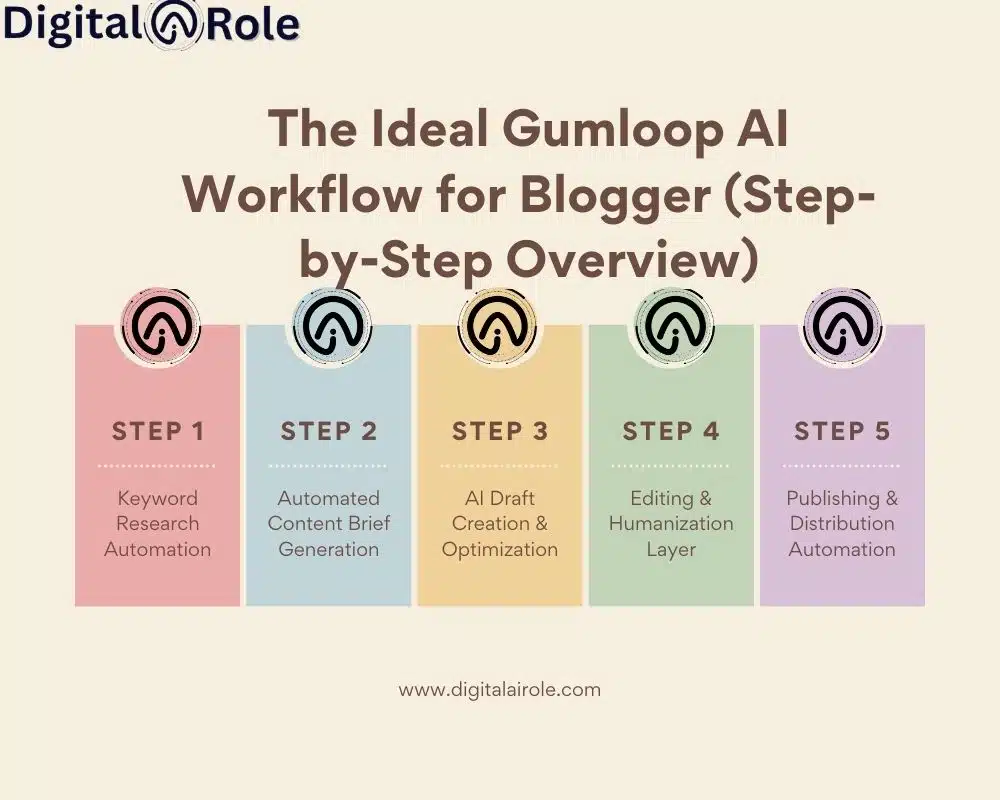
To achieve a scalable content system, simply having random automation is not enough; rather, it requires a structured Gumloop AI workflow for the blogger that ties the research, writing, editing, and publishing process into a single, streamlined pipeline.
The following is a realistic, end-to-end structure that you can apply now.
Step 1 – Automation of Keyword research
Most bloggers waste time on keyword research. It is tedious and time-consuming to open tools, export CSVs, filter keywords, manually cluster, etc.
This process can be automated with Gumloop.
Relating keyword tools to AI.
Naturally, you can bookmark keywords and manually enter them into an AI tool; however, you can also set up a trigger that sends the selected keywords into your content workflow. For example:
- Input: Primary keyword
- Automation: Get related queries.
- Results: Sorted keyword list in your workspace.
- Clustering around topics automatically.
AI can automatically sort related keywords into topical groups. This helps you:
Build semantic authority
Develop pillar and cluster content.
Do not cannibalize keywords.
Keywords extraction on the trigger.
Set rules like:
- When a keyword has low difficulty and high intent, send it to the content pipeline.
- “When new search queries are presented, create a brief.
This makes research a semi-autonomous system.
Result:
There is a reduction in research time, which can go from hours to minutes — this can be very useful when you have weekly posts to make.
Step 2 – Auto-Generation of Content Brief
After you enter a keyword into your Gumloop AI workflow for a blogger, the next step is content brief creation.
Developing organised descriptions through AI.
You can automate:
- H2/H3 headings to maintain structure
- Search intent analysis
- Add FAQ sections
- Suggested internal links
You do not have to start writing unthinkingly; get an outline ready to write on.
NLP keyword extraction
AI can pull:
- Semantic keywords
- Related entities
- People Also Ask questions.
- Contextual phrases
This will make your article up to date with modern SEO and topical depth.
Automation of the summary of competitor analysis.
You can trigger:
- Overview of the highest ranking articles.
- Gap analysis
- Content length benchmarks
- Structural insights
Instead of manually studying 5 SERP results, you get a competitive snapshot in a brief format.
Step 3 – AI Draft Creation and Optimisation
It is time to draft, now as part of your workflow.
Activation of AI content generation.
Once the brief is approved:
- Gumloop issues ordered commands to your AI writer.
- It generates the draft automatically.
- The information is stored in Google Docs or the CMS draft.
- This eliminates the need for repetitive prompt engineering for each post.
- Auto-inserting semantically meaningful keywords.
You can configure rules to:
- Use both primary and secondary keywords.
- Striking a balance between keyword density.
- Use related phrases out of context.
- This works in favor of non-over-optimized SEO.
- Readability formatting (H2/H3 automation)
Automation can:
- Apply heading structure
- Add bullet points
- Insert short paragraphs
- Prepare schema-ready FAQs.
The output is a draft that is already well-organized and compliant with the best practices of readability.
Step 4 – Editing Layer, Humanization Layer
This is where most bloggers make their mistake: they stop at the AI draft.
An effective Gumloop AI workflow for bloggers should also have a human refinement phase.
The need to refine human-written AI.
AI is efficient–but it lacks:
- Real-world experience
- Personal insights
- Niche-specific nuance
- Emotional depth
Your content is unique when you edit it yourself rather than mixing it with generic AI-generated content.
E-E-A-T signals (Experience, Expertise, Authority, Trust) should be added to the article.
During editing, add:
- Personal examples
- Case studies
- Data references
- Expert quotes
- Samples or real-life examples.
This builds confidence among readers and search engines.
Plagiarism detector and originality detector.
Include automated:
- Plagiarism scans
- AI-detection balancing
- Fact-check workflows
- Quality control must be conducted before publication.
Step 5 – Automation of Publishing and Distribution
The last step of your Gumloop AI workflow blogging is distribution.
This is where the majority of bloggers waste more time: formatting, uploading, and scheduling.
Auto-uploading to WordPress
Once approved:
- One can push content to WordPress as a draft.
- Automatically assigning categories and tags.
- Placeholders of featured images are placed.
- Creation of meta descriptions.
You can automate:
- SEO titles
- Meta descriptions
- Open Graph descriptions
- Schema FAQ snippets
- Automatic scheduling of social content.
When a blog post goes live:
- Create Twitter/X post
- Generate LinkedIn caption
- Pinterest draft description.
- Schedule automatically
- No more manual repurposing.
- Automation of email newsletters.
You can trigger:
- Summaries of newsletters are generated automatically.
- It also gives Subject line suggestions.
- Email scheduling according to the user’s time needs.
Here, most bloggers discover the true power of automation.
The Gumloop Use Guide to Blogging The Smart Way.
This is not the way to automate everything to learn how to use Gumloop and blog.
Start with one workflow:
- Automate keyword – brief
- Then expand:
- Brief – draft
- Then:
- Draft – publish – promote
- Build gradually.
When adopted properly, this step-by-step system will turn blogging from a manual grind into a scalable, structured AI automation stack, enabling continuous publication without compromising quality.
Live Gumloop AI on Different Types of Bloggers
1. The SaaS/Tech Blogger Procedure
Monday research triggers: RSS feeds (Product Hunt, Hacker News, G2, and industry blogs) are automatically generated. AI generates post angles.
Thursday post: Roundups and comparison posts that are auto-generated and will publish on a schedule.
Friday distribution: Competitor integration will inform you when you are being mentioned. Gumloop is an automated response generator. Your social, email, and Slack are filled with pre-written information.
Timeline: Monday – Research – Wednesday – Write – Thursday – Publish – Friday – Distribute.
The Lifestyle/Personal Brand Blogger Process.
Email segmentation: Gumloop monitors readers’ interactions with content and automatically categorizes them.
Social calendar automation: Pre-written post templates are activated by monthly content themes. You personalize, you do not make something out of nothing.
Recap posts: Gumloop takes your 3 best posts per month and makes a “Best of… publicize and time table marketing.
Solo creator advantage: Stability without fatigue- the most difficult part of being a one-person company.
2. The Niche/Authority Blog Workflow
Deep research automation: Various authoritative data (competitor analysis, industry reports, academic papers) are input into a single workflow. AI synthesizes findings.
Topic clustering: Posts will automatically sort themselves into topic pillars. Internal linking proposals gather similar content.
SEO pre-optimization: Auto-generates metadata, density of keywords, and readability scores before you move to press as opposed to creating.
Building authority: Search engines grant authority in topicality. It is systematically constructed in this workflow by intelligent internal connectivity and thematic grouping.
Common Mistakes When Implementing Gumloop Workflows

Non-human intervention can be strong; however, it must be deliberate. A significant number of bloggers adopt a Gumloop AI workflow for blogger setup with a view to immediate scale, only to discover that poorly designed systems generate new issues rather than solving the existing ones.
And, by way of escaping them, let us go through the most frequent errors.
1. Over-Automating Creative Work
It is tempting to do everything automatically.
Keywords – AI draft – Auto-publish – Complete.
However, there is a truth in this: complete automation of writing and ideation nearly always turns out to be counterproductive.
AI can:
- Structure information
- Summarize research
- Generate outlines
- Draft coherent paragraphs
But it cannot replicate:
- Your lived experience
- Your niche insight
- Your storytelling style
- Your emotional intelligence.
Once you master the process of creative thinking, your content begins to sound like everyone else’s. And in competitive niches, that is hazardous.
The better balance?
Automate administrative-intensive tasks:
- Keyword organization
- Formatting
- Internal linking
- Publishing
- Distribution
And reserve human input for:
- Positioning the article.
- Add Unique angles that highlight the experience and ensure E-E-A-T.
- Use Case studies from top brands and industry specialists that build authority.
- Share Strong opinions with users who benefit from them.
- Maintain a Brand voice that aligns with your industry and conveys your brand identity to users.
Authenticity reminder:
Your competitive advantage is your distinctive voice. It should be increased, not decreased, by automation.
2. Failure to focus on Quality Control
Blind publishing is one of the greatest threats of automation.
Independent auto-generated material may result in:
- Factual inaccuracies
- Outdated information
- Repetitive phrasing
- SEO over-optimization
- Tone inconsistencies
Search engines are also becoming more rewarding of useful and trustworthy content. When your system posts unvetted AI drafts, you risk losing credibility.
Introduce physical barriers in the workflow.
For example:
- Short-term approval before writing.
- Review of the draft before publishing.
- Scans for fact-check and plagiarism.
Final readability pass
This forms a hybrid workflow:
Automation tackles structure; humans guarantee quality.
The ethical use of AI is important for building trust. Be open in your procedure. Focus on value, not volume. Put more emphasis on user benefit rather than speed.
This is how you make automation long-term, authoritative.
3. Distorted Integrations
The other error is related to multiple tools simultaneously.
Keywords tool – AI writer – Google Docs – CMS – Email – Social scheduler – Analytics – CRM – Repurposing tool…
Your manual process is now more complex than your workflow.
In integrations that are not synchronized:
Data fields mismatch
Formatting breaks
Content uploads incorrectly.
Automations do not go off at the correct time.
And debugging is a pain.
The fact is that workflow building has a learning curve.
Expect:
- Small errors
- Testing phases
- Adjustments
Normalize it.
- Rather than creating a 10-step automation at once:
- Start with the keyword – brief.
- Then add a brief draft.
- Then add draft – publish.
- Layer gradually.
Sophisticated authors consider the workflow design a product development process: build – test – refine – scale.
4. Ignoring Analytics
This is the silent murderer of automated blogging systems.
Numerous creators establish processes and presuppose that the more output, the more traffic.
Yet, unmeasured automation is guesswork.
In case you are operating an AI automation stack to blog, you need to monitor:
For Keyword Workflows:
- Ranking movement
- Impressions growth
- The performance of keyword clustering.
- For Content Workflows:
- Organic traffic per article
- Average time on page
- Scroll depth
- Bounce rate
For Distribution Workflows:
- Email open rates
- CTR
- Social engagement
Hobby bloggers and scalable creators differ in their approach to data-driven iteration.
In terms of E-E-A-T, effective content marketers not only post but also measure, refine, and optimize their posts. They do not see content as something to do; they see it as an investment.
Leverage comes with automation.
Analytics provides you with direction.
Use both together.
Gumloop workflows can be deployed in ways that increase your productivity by a factor of 10. However, when hasty or out of tune, they can compound errors.
Build intentionally. Review consistently. Improve continuously.
Conclusion
By now, you must have understood that automation is not about displacing your creativity, but rather about safeguarding it.
An intelligent Gumloop AI workflow for a blogger does not turn your posts into robots. It eliminates the monotonous drag that slows you down, keyword sorting, formatting, uploading, and scheduling, until you can be more strategic, tell more stories, and gain power in your niche.
Speed, in itself, is not the true benefit of learning to use Gumloop to blog. It’s consistency.
Once the research is streamlined into structured briefs, your briefs turn into hot-wire drafts, and your drafts transit to publishing and promotion, you cease winging it week to week. You develop a re-engineered system. And in SEO, systems win.
That said, Gumloop isn’t magic. It works best for:
- Bloggers who post regularly.
- Those who scale content are niche site builders.
- Agency dealing with several clients.
- Innovators who post and not processes.
It’s not ideal if you:
- Publish occasionally
- Want it to be mostly by hand, with creative control.
Need not keep track of analytics or optimize workflows.
The future of content creation is with creators who will integrate human intelligibility with intelligent automation. An intelligent AI automation stack for blogging enables you to scale without compromising on quality, if you build it deliberately.
- Start small.
- Fully automate a process.
- Test it.
- Refine it.
- Then expand.
Since it is not about creating more content.
It is to create a smarter content engine – one that will assist you even after you have hit publish.